
Paying off debt by interest rate sounds like a job for someone with a finance degree and a free Saturday. It isn’t. It needs the rate printed on each statement and a sheet that does the sorting.
You’d like less of every payment to disappear into interest. You’d also like a plan you can set up tonight without learning any new math. Wanting both is completely reasonable.
The answer isn’t studying how interest works. It’s a free debt avalanche spreadsheet that lines up your debts by APR. One evening of typing shows your order, your debt free month and the interest it will cost.
What Sorted by APR Means in This Free Spreadsheet
APR is the yearly interest rate on a debt. The higher it is, the more interest gets added to what you owe every month.
Sorted by APR means the debt with the highest rate sits at the top of your list. That debt gets every extra dollar you can spare.
The Consumer Financial Protection Bureau calls this the highest interest rate method, and describes it as the way to save money over time (CFPB). It’s also known as the debt avalanche.
Everything else still gets its minimum payment. When the top debt is gone, its payment moves down to the next highest rate, and your total each month stays the same.
The free debt avalanche spreadsheet does that sorting the moment you type. It’s an Excel file with three tabs: How to use, My Debts and Payoff Plan. Google Sheets opens it too, after you upload it to Google Drive.
That doesn’t mean giving up on quick wins for good. It means choosing the lower cost order, and letting the sheet show the trade in plain numbers.
Still deciding between this and paying the smallest debt first? Debt snowball vs avalanche compares the two side by side.
Highest rate on top, every minimum paid, and no sorting by hand.
Find the Real Interest Rate in One of 3 Places

The whole avalanche order rests on one number per debt, so it’s worth a few careful minutes.
Three places usually have it:
- Your latest statement. The rate is printed there, often labeled APR.
- The lender’s app or website, usually with your account details.
- The phone number on the back of the card. Ask what rate you’re charged on what you owe today.
Some debts need a little thought. Here’s what to type for the common ones:
| If the debt is | Type this rate |
|---|---|
| A card with one rate on the statement | That rate, with a percent sign, like 24.99% |
| A medical bill or loan with no interest | 0% |
| A card on a 0% promo rate | 0% for now, then the new rate when the promo ends |
| A car loan or personal loan | The rate on your loan paperwork or in the lender’s app |
| A rate you can’t find anywhere | Call the lender and ask, then type what they tell you |
If a promo rate ends next spring, your order will likely change then. Stick a note on the fridge with the end date, so you remember to update the sheet.
That doesn’t mean every rate needs two decimal places tonight. A close number is fine to start, and the next statement can correct it.
Curious what one card’s rate is costing right now? The credit card interest calculator shows it per day, per month and per year.
One right rate per debt is what the whole order stands on.
Fill In the My Debts Tab in One Evening
Excel opens the file straight from your downloads. For Google Sheets, upload it to your Drive first, then open it from there with Google Sheets.
Click My Debts at the bottom. Five made up debts are already there, $17,640 in all, so you can see a finished plan before you start.
Type your own debts over them, one per row: a name, the amount you owe, the rate and the minimum payment. There’s room for 10.
Put a percent sign after each rate, like 22.9%, so the sheet reads it as a rate and not a whole number.
If you have fewer than five debts, clear out the example rows you don’t use. Anything left there stays in your plan.
Then fill in the two boxes near the top: your monthly extra and the month you’ll start.
You can type the debts in any order. The sheet ranks them for you, highest rate first. If two debts share a rate, the smaller amount goes first.
Note: Every number in the file starts out as an example. Replace them all, including the extra and the start month, so the dates belong to you.
Ten rows and two boxes. The ranking is done for you.
Read the Payoff Order Before the Debt Free Date
When everything’s typed, your eyes will jump to the gold boxes. Read the payoff order first.
It’s the list the sheet builds under your results, highest rate at the top.
In the made up example, it goes Visa at 27.49%, Mastercard at 22.9%, store card at 17.99%, car loan at 6.5% and the medical bill at 0%.
So the Visa gets the $150 extra plus its own minimum. Everything else gets its minimum, every month.
Here’s what the gold boxes show for that example, starting in November 2026:
- $685 going out each month, the same amount from start to finish.
- 31 months to pay it all off, with May 2029 as the debt free month.
- $3,360.65 in interest, and $21,000.65 paid in total.
The same five debts in the debt snowball spreadsheet take 32 months and $3,661.95 in interest. In this example, the avalanche order saves $301.30 and one month.
One surprise hides in the order. The little store card and the medical bill finish in months 22 and 23 on their minimums alone, while the extra is still busy with the bigger cards.
The order tells you where this month’s extra goes. The date is simply where that order ends up.
Expect a Long Wait for the First Paid Off Debt
Here’s the honest part. In the example, nothing is fully paid off until month 15, January 2028, when the Visa reaches $0.
Fourteen months without crossing off a debt can feel like nothing is happening. Something is. The extra is going where the interest costs the most.
To see it, look at the line for what’s still owed on all debts, on the Payoff Plan tab. By month 12, the example total has dropped from $17,640 to $11,538.84.
That’s more than $6,100 paid down, even though no single debt is finished yet.
That doesn’t mean you have to grit your teeth for a year. A few small things make the wait easier:
- Write the month your first debt reaches $0 on a calendar you see every day.
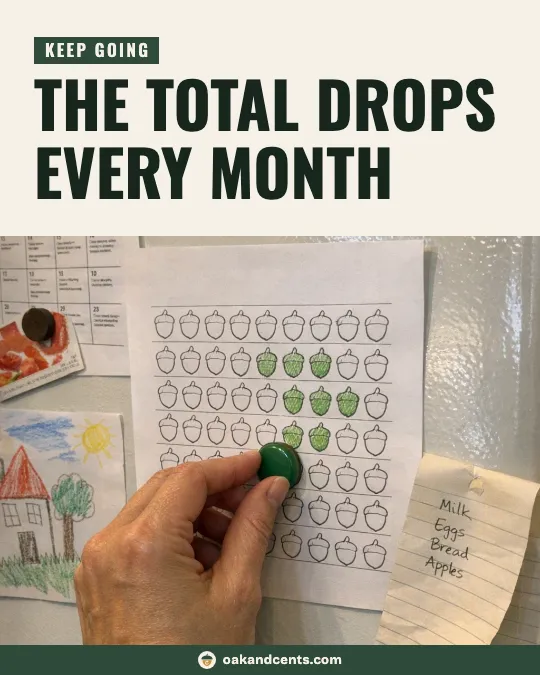
- Color in the free coloring chart on this page as the total drops. Every acorn you color is one percent of the way there.
- Log each month in the free debt payoff tracker spreadsheet, which shows the percent paid off overall.
If you’d like one early win before you settle in, clearing a very small debt first is a fair trade. The middle path in debt snowball vs avalanche shows how to do that once, on purpose.
The first payoff takes longer this way. The total still falls every single month.
Update the Sheet When an Interest Rate Changes
Rates don’t always stay put. A promo can end, a card can raise its rate, or a phone call can bring one down.
When that happens, type the new rate into that debt’s cream box. The order and the dates redraw themselves, so this month’s extra may go somewhere new.
A lower rate is worth asking for. The FTC suggests calling your card company to negotiate a lower interest rate, and you can make that call yourself, for free (FTC).
Say this: “I’ve paid this card every month, and I’m working on a plan to clear it. Could you lower my interest rate?”
They may say no, and that’s okay. Here are a few more ways to word the request.
Every few months, refresh the amounts you owe and move the first payment month forward. That keeps the plan in step with your real statements.
A new rate is new information. Give it to the sheet and follow the new order.
If Interest Is Growing Faster Than Your Payments
Sometimes the sheet raises a flag. A note beside a debt means its minimum doesn’t even cover the monthly interest. Left alone, that debt would grow every month.
A line under your results may also say your payments won’t clear everything within 10 years, with a nudge to add a bit more extra.
Those notes aren’t a verdict on you. High interest rates can be very hard to outrun on minimums alone.
If every minimum is already a stretch, set the spreadsheet aside for now and begin with the steps for when nothing is left after bills.
A nonprofit credit counselor is another option. With a debt management plan set up through a counselor, creditors may agree to lower your interest rates or waive certain fees (FTC).
You can start your search for one on the National Foundation for Credit Counseling website.
Steady footing comes first. The avalanche will still be here when the minimums fit.
Tonight, Copy Down Every Rate and Let the Sheet Sort Them
No finance degree and no free Saturday after all. Just the rate off each statement and one quiet evening with the sheet.
Tonight, find the rate for every debt and copy each one into its cream box. Read the payoff order, then circle your debt free month on the calendar.
This week, send your extra to the highest rate on the list.
Want to see your numbers both ways before you commit? The debt payoff calculator puts both orders next to each other, with a debt free date and an interest total for each.
The highest rate goes first. Everything after that is keeping the order.