
Five statements are fanned out beside the laptop, the tea has gone cold, and you’ve added up the same numbers on your phone three times tonight.
You want a real plan with a date at the end. But building one yourself takes math and an evening you don’t have, and a guess isn’t a plan. Wanting help with the math is simply sensible.
The answer isn’t a finance class. It’s a free debt snowball spreadsheet that does the adding while you type. Give it 15 minutes, and your debt free month can be sitting in a gold box before you rinse that mug.
What This Free Snowball Spreadsheet Does While You Type

A spreadsheet can sound like homework. This one works more like a form: you fill in a few boxes, and the plan builds itself.
It’s a free Excel file with three tabs along the bottom. How to use is a short page of instructions.
My Debts is where you type. Payoff Plan shows every month of your plan, and it fills in on its own.
The boxes are color coded, so you always know where to look. Cream boxes are for your numbers. White boxes fill in by themselves, so you can leave them alone. Gold boxes hold your key results.
That doesn’t mean you need to know anything about spreadsheets. Typing a number is the only skill it asks of you.
When you first open it, five made up debts are already filled in: a store card, a medical bill, a Visa, a Mastercard and a car loan, $17,640 in all.
They’re only there to show how it works, and you’ll type right over them.
The sheet follows the debt snowball order: smallest amount owed first, every minimum paid, and each paid off payment rolled onto the next debt.
If you’d like the reasons behind that order, the debt snowball method guide walks through it one step at a time.
You can use it in Excel, or move it into Google Drive and use it in Google Sheets. There’s no sign up.
The method is simple. The sheet just saves you the adding.
Minutes 1 to 5: Gather Four Numbers for Each Debt
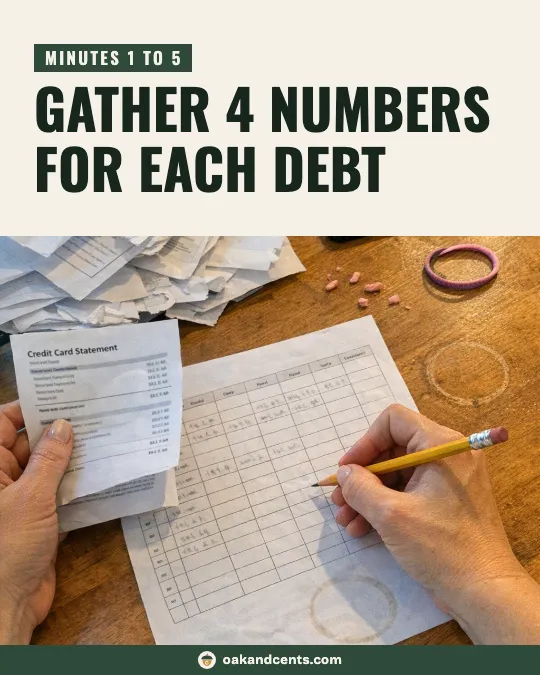
Before you open the file, pull up your statements or your lender apps. Five minutes of gathering makes the typing part easy.
Each debt needs four things. Here’s what they are and where they usually live:
| What to type | Where to find it |
|---|---|
| A name for the debt | Anything you’ll recognize, like “Visa” or “Dentist” |
| The amount you owe | Your latest statement or the lender’s app, as of today |
| The interest rate | On the statement, often listed as the APR (the yearly interest rate) |
| The minimum payment | On the statement, usually close to the due date |
Include the small ones too, like a medical bill on a payment plan or a store card you rarely use. A debt with no interest still goes on the list, with a rate of 0%.
If your numbers are scattered across apps and envelopes, collect them on paper first. The printable Debt Payoff Worksheet in the downloads box gives each debt its own row.
That doesn’t mean every number has to be exact to the cent. Today’s amount, rounded to the dollar, is close enough for a plan.
Seeing the numbers side by side can feel heavy for a minute. They were already there, though. Now they’re in one place, where you can do something with them.
Four numbers per debt. That’s all the sheet needs from you.
Minutes 6 and 7: Open the File in Excel or Google Sheets
Download the free debt snowball spreadsheet from the box on this page. It saves as a regular Excel file.
In Excel, open it like any other file. If a bar at the top asks you to enable editing, click it so you can type.
In Google Sheets, it takes one extra step:
- Go to Google Drive and click New, then File upload.
- Choose the snowball file from your downloads.
- Right click it in Drive, choose Open with, then Google Sheets.
A laptop or computer makes the typing easier, since the boxes are small on a phone screen.
You don’t need to change any settings or add anything. Everything the plan needs is already inside the file.
Once it’s open, you’ll land on the How to use tab. It’s six short lines, and they’re worth the minute.
Seven minutes in, and the hard part is behind you.
Minutes 8 to 12: Type Your Debts Into the Cream Boxes

Click the My Debts tab at the bottom. You’ll see room for ten debts, with the five examples at the top.
Type your first debt right over the Visa line: what you call it, what you owe, its rate and its minimum. Then do the next one, and the next.
You can type them in any order you like. The sheet sorts them itself, with the smallest amount owed on top, and gives each one its number in the payoff order.
Two small habits save a lot of head scratching.
First, type each rate with a percent sign, like 19.99%. That way it can’t be misread as a much bigger number.
Second, clear the example rows you don’t need. If you have three debts, delete the leftover example names and numbers, or they’ll stay in your plan.
If two of your debts owe exactly the same amount, the higher interest rate of the pair goes first.
That doesn’t mean you have to finish every row tonight. If one statement is missing, type the rest and add that debt when you find it. The dates will shift once it’s in.
You type the facts. The order takes care of itself.
Minutes 13 to 15: Pick Your Extra and Read the Gold Boxes
Near the top of the My Debts tab are two more cream boxes: the extra you can pay each month, and the month of your first payment.
The extra is whatever you can add on top of the minimums every single month, without needing a card to cover groceries later. The sheet’s own note says even $25 makes a difference.
Then look at the gold boxes under Your results. With the five made up debts and $150 extra, starting in November 2026, they show:
- $685 a month in total: $535 in minimums plus the $150 extra.
- 32 months until the last debt is gone, about 2 years and 8 months.
- June 2029 as your debt free month.
- $3,661.95 in interest along the way, and $21,301.95 paid in total.
Now try a different number. Change the extra to $200 in the same example, and the debt free month moves up to March 2029. That’s three months sooner, with $3,248.74 in interest, about $413 less.
Try a smaller number too. A plan you can keep in a tight month beats a bigger one that only works in a good one.
Try this: Type three different extras, jot down the debt free month for each, then keep the one that still leaves room for groceries.
Not sure how much is really spare once the bills are paid? Our guide to making a budget while you’re in debt walks you to a number that holds.
The gold boxes answer the question you’ve been working out on your phone. Let them.
Open the Payoff Plan Tab Once a Month

Fifteen minutes gets you a plan. A two minute look each month keeps it working.
The Payoff Plan tab shows every month for up to 10 years. Each line has the date, the total still owed on all your debts, what you paid that month and how much of it went to interest.
Further along each line, every debt has its own set of boxes, and the sheet marks the month each one reaches $0.
There’s also a snowball box that shows your extra plus any payments freed up by debts you’ve already paid off.
In the example, the store card reaches $0 in month 4, February 2027. From then on, its payment joins the payment on the next debt.
That doesn’t mean you have to open the file every week. Once a month, after you’ve paid, check which debt is the target now and send the extra there.
Every few months, you can refresh it. Type in today’s amounts owed and next month as your first payment, and the plan redraws itself from where you really are.
If you’d like a place to log what you’ve paid, the free debt payoff tracker spreadsheet keeps a monthly record and shows the percent paid off for each debt.
Rather use paper? The free debt tracker and the coloring chart on this page let you color in your progress by hand.
The plan lives in the sheet. The progress can live wherever you’ll see it.
What a Heads Up Note in Your Plan Means
Now and then, the sheet flags something. It’s worth a calm look, not a panic.
If a debt’s minimum payment doesn’t cover the interest added each month, a note appears beside it that says the payment is less than the monthly interest. On its own, that debt would keep growing.
If the whole plan can’t finish within 10 years, your results say so and suggest adding a bit more extra each month.
Neither note is a judgment about you. It’s the sheet pointing at the debt that needs a phone call.
That call costs nothing. The FTC suggests asking the card company to lower your rate and to agree to a payment plan you can afford.
No debt relief company needs to be paid to make the call for you, either (FTC).
Say this: “I’m working on a plan to pay this off, and my minimum barely covers the interest. Is there a lower rate or a payment plan you can offer me?”
For more ways to start that conversation, try these scripts for asking your card company to lower the rate.
If the minimums themselves don’t fit yet, let the spreadsheet wait. The steps in our guide for when there’s no money left over come first.
Want a second pair of eyes on the list? Nonprofit counselors at National Foundation for Credit Counseling member agencies can look it over with you.
A note in a box is information. What you do with it is still your call.
Run the Same Debts Through the Avalanche Sheet
The snowball pays the smallest debt first. Its twin, the free debt avalanche spreadsheet, pays the highest interest rate first. It has the same three tabs and the same cream boxes.
Type the same debts into both, and you can see the trade for your own numbers.
With the five made up debts and $150 extra, the avalanche finishes in 31 months with $3,360.65 in interest. That’s $301.30 less and one month sooner. The snowball, though, clears its first debt 11 months earlier.
If you’re torn, debt snowball vs avalanche helps you choose, and the debt avalanche spreadsheet guide shows how to fill in the other file.
Same debts, same 15 minutes. The sheet you’ll keep opening is the right one.
Fifteen Minutes Tonight, One Date Worth Circling
The statements by the laptop can go back in their folder tonight. Everything they were trying to tell you now fits in one file.
Tonight, gather your four numbers per debt and type them into the cream boxes. Try two or three extras, and circle the debt free month you can live with.
This week, send that extra to the debt at the top of your payoff order.
Want to check the math, or see both methods on one screen? The debt payoff calculator uses the same monthly interest math as the sheet.
One file, one date, and a cup of tea you can finally drink warm.